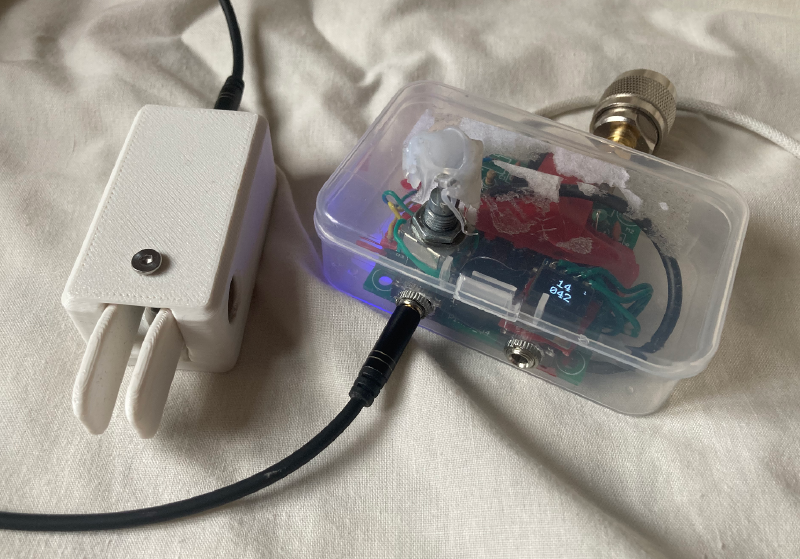
Pinxy - Now you have a Pixie on 4 bands… Fully!
Requireing a MCU, Clk generator, encoder and screen.
Outputs:
0.6W on 40/80M
0.2W on 20/30M
Required Components
- Firmware
- Si5351: AliExpress Link
- Pixie Kit: AliExpress Link
- OLED: AliExpress Link
- ESP32-C3: AliExpress Link
- Rotary Encoder: AliExpress Link
- Wires
Note: Some links are referrals.
Usage
Twist to go (left) up / (right) down, press encoder to change step size, hold encoder for about 1 second to change band.
Step sizes toggle thru: 1kHz, 10kHz, 100kHz
In the firmware you can edit line 103 to calibrate it, use a SDR or freq counter, whatever is the most relieable in your arsenal of tools, change 75000 to eg 70000 and see if the display and sdr shows closer to that freq or not, but my stock settings are pretty pretty close, to the 10th Hz:
if (!si5351.init(SI5351_CRYSTAL_LOAD_8PF, 25000000UL, +75000))
Wire Wire Solder. Sn60Pb40 ;>
| Function | Pin |
|---|---|
| Encoder A | GPIO 7 |
| Encoder B | GPIO 6 |
| Encoder Button | GPIO 5 |
| I2C SDA | GPIO 8 |
| I2C SCL | GPIO 9 |
For thoes who dont know, SI5351 and the OLED will share the same pins for I2C
Connect CLK0 from SI5351 to the pin closer to the transistor where the crystal usually would sit, and remove the original crystal.
I added a buck converter to 12V for the pixie, it is fully powered by just a usb-c port from the esp32-c3. I’m not fully-fully giving a tutorial for this, as anyone with a pixie i assume has probibly enough to know how to wire it from what i gave, if not, email me and if i have time i will make a video and proper instructions.
What next…?
I might work on a more involved version next with more analog pixie mods like higher wattage, maybe adjustable, adding dual paddel modes, use the built in beeper to hear RX too, smoother steps.. Whatever else.
Buy, No DIY? You can here. For a cost.